Wedding RSVP and privacy: what to check
Before using a wedding RSVP, check where replies are sent, who can view them and how an error can be corrected. An unlisted link is not an authenticated space. Ask only for the information needed to organise your celebration.
Does a demo reply reach the couple?
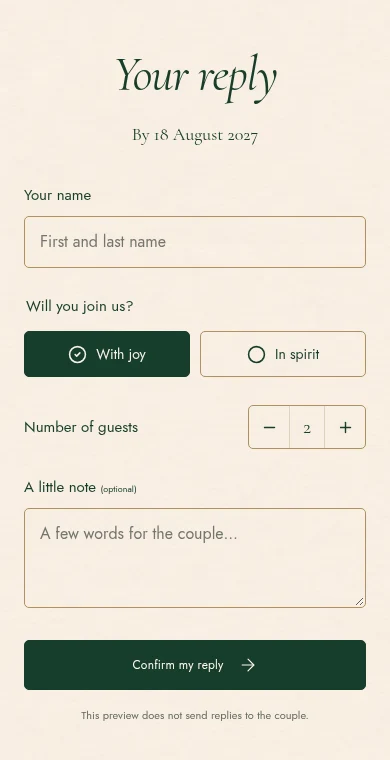
No. QISSEA’s public demo forms keep replies local and do not submit them. They demonstrate the interaction. For your own invitation, you receive a link to Couple Space to see attendance replies, guest counts and messages.
Every design in the current collection can be personalised. Check the reply form and its options while reviewing your own invitation.
Count people and household replies separately
Example: one household confirms two adults and a child. A guest confirms they are coming with their invited partner. A third household declines. That is three replies, two accepting households and five people expected. Confirm who is included before counting children or plus-ones. A household that has yet to reply still needs follow-up.
What should you ask guests for?
Keep an RSVP easy to understand. Depending on the agreed configuration, a form can ask for a name, attendance, party size and an optional message. Explain whether the total includes the person replying.
- Ask for a name that identifies the reply.
- Make attendance choices and the number of people clear.
- Keep optional notes genuinely optional.
- Avoid identity documents, sensitive information and unnecessary private details.
Who can open an unlisted invitation?
Anyone with the link can open an unlisted invitation. Being absent from search results, having a hard-to-guess identifier and requiring a password are different protections. Do not describe a link as protected by sign-in when there is no authentication.
Share with the people concerned and avoid confidential details. If your event needs particular access controls, ask the studio to confirm a suitable solution before relying on it.
How can you check an RSVP before sharing?
When reviewing your invitation, agree on a test reply with the studio and check that it appears in Couple Space. You will know where to find attendance, guest counts and messages before sharing the link with your guests.
Keep a backup contact for a guest who cannot reply. If a response needs changing or appears to be missing, have the correction confirmed rather than sending it repeatedly without knowing what happened. No real reply is needed to try the catalog demos.
What should you confirm with QISSEA?
Before agreeing, confirm the design, reply features, content to provide, timing, revisions and payment arrangements. Guest management should match the service you actually agree, not only a presentation image.
The privacy policy explains the information handled and how to contact the studio. Read it before supplying wedding details. For questions about an invitation or replies, use the official WhatsApp contact shown on this website.
How we prepare these guides
These guides draw on the features shown on this website and the studio’s process. Commercial information is checked with QISSEA; the terms of your own request are confirmed before you agree.
The QISSEA teamExplore more guides
How to share your wedding invitation on WhatsApp
Use an adaptable message, test the final link and check the useful details before sharing your wedding invitation with guests.

When to send wedding invitations in Morocco
Plan when to give travelling guests notice, when to send the full wedding invitation and how to set the RSVP deadline.